Bulk Contact Import

Add multiple contacts to your directory in minutes with bulk import
We've made it easier to build and manage your company directory with Bulk Contact Import. Hirers can now add and invite multiple contacts at once using a simple CSV upload, helping teams populate directories faster and reduce manual administration when onboarding new contractors or setting up a new directory.
Why we made this change
Building a company directory often requires adding multiple contacts at once, especially when onboarding new teams, migrating existing contractor networks, or setting up a directory from scratch.
Previously, adding multiple contacts often involved a more manual process, which could be time-consuming. Bulk Contact Import brings this capability directly into the platform, giving hirers a faster, self-service way to add contacts at scale while maintaining visibility and control throughout the process.
What's new
- Bulk contact uploads: Add and invite multiple contacts to your company directory in a single upload.
- Simple CSV template: Download a ready-made template, populate your contact details, and upload the file directly into YunoJuno.
- Built-in validation: Each row is automatically checked to identify missing information, formatting issues, duplicate records, and invalid email addresses before contacts are imported.
- Import preview: Review which contacts will be added, which already exist in your directory, and which cannot be imported before confirming the upload.
- Clear error reporting: Validation errors are surfaced immediately, allowing you to correct issues and re-upload your file quickly.
- Self-service directory management: Populate and grow your directory without requiring manual intervention or support requests.
How it works
To add multiple contacts, navigate to your Directory and select Add Contacts.
Choose Add Multiple Contacts, download the provided CSV template, and populate it with your contacts' first name, last name, and email address. Once completed, upload the file to YunoJuno for validation.
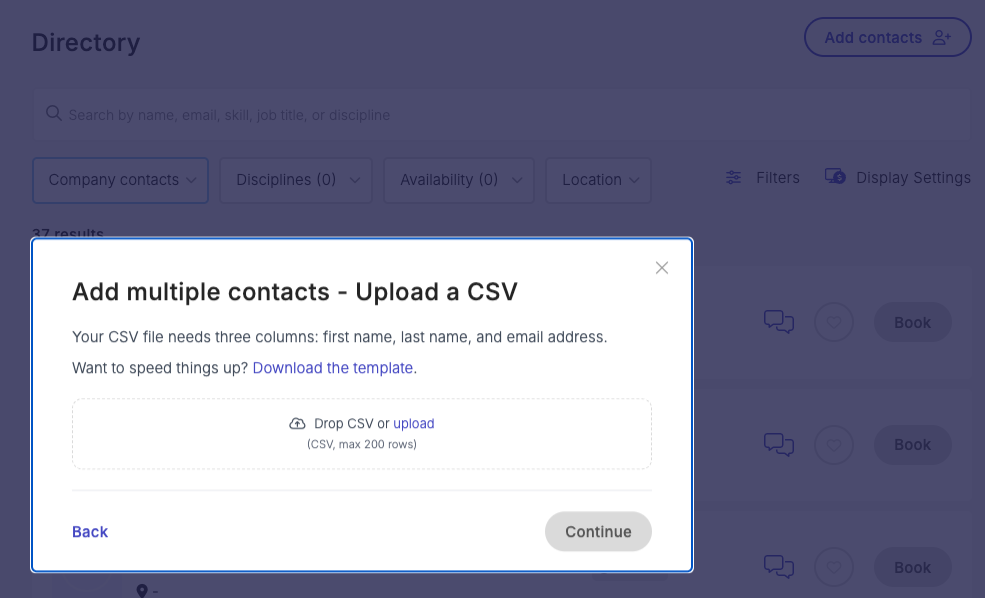
You'll then receive a preview showing:
- Contacts that will be added
- Contacts that already exist in your directory
- Contacts that cannot be added and may require support assistance
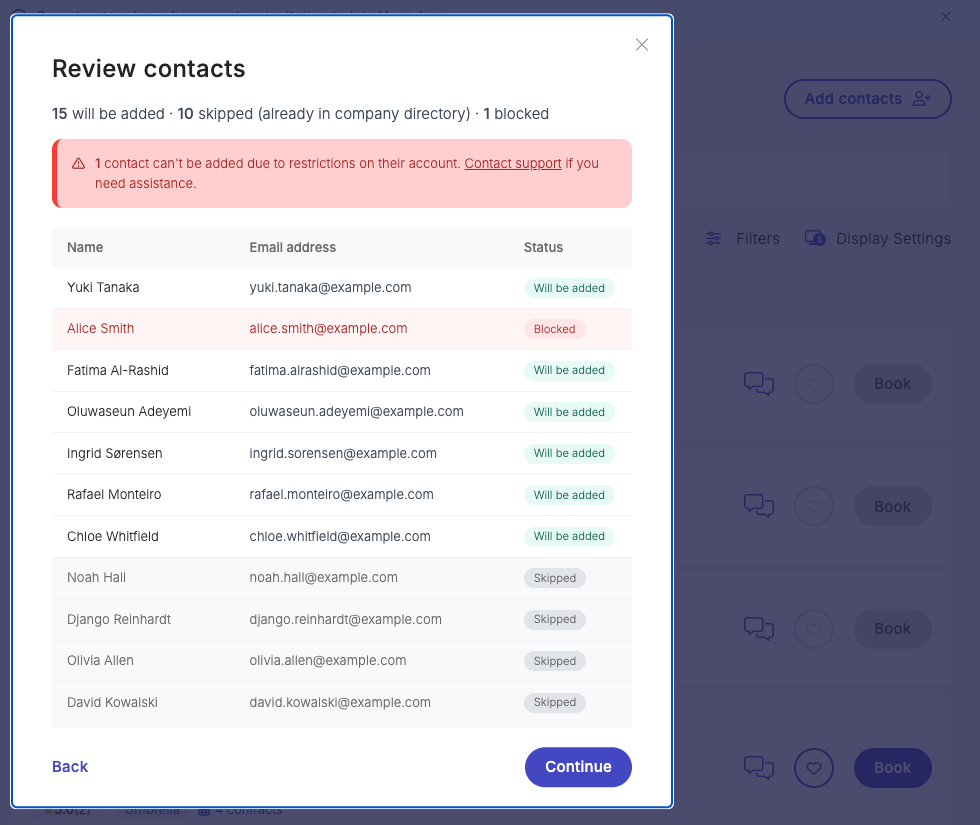
Once you've reviewed the results, simply confirm the upload and invitations will be sent automatically.
Benefits for teams
Bulk Contact Import helps organizations build and manage contractor networks more efficiently.
For hiring teams, it significantly reduces the time required to populate a directory, making it easier to onboard new groups of contractors and maintain up-to-date contact records. For administrators, built-in validation and review steps provide confidence that data is accurate before invitations are sent.
By bringing this process into a self-service workflow, teams can move faster while maintaining control over their directory data.
Check out Bulk Contact Import today
Start importing contacts in bulk and build your company directory faster with YunoJuno.